





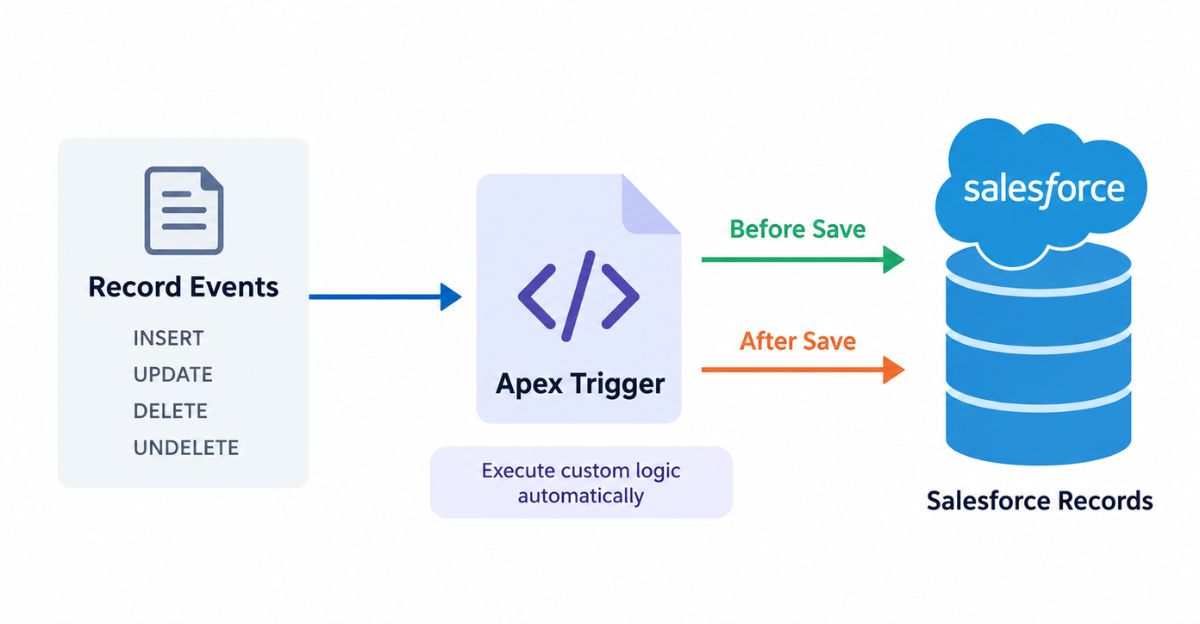
Apex Triggers in Salesforce are Apex code that automatically runs when a specific record event occurs, such as insert, update, delete, or undelete. They are used to perform custom actions or business logic when standard Salesforce automation is not enough.
For example, a trigger can validate a record before saving it, update a field automatically, or create related records after a record is inserted.
What Is an Apex Trigger?
An Apex Trigger is a piece of Apex code that automatically executes before or after a specific database operation on a Salesforce record.
For example, this trigger prevents an Account from being saved without a Phone number:
trigger AccountTrigger on Account (before insert) {

    for (Account acc : Trigger.new) {

        if (String.isBlank(acc.Phone)) {
            acc.addError('Phone is required.');
        }
    }
}
Here, before insert means the trigger runs before Salesforce saves the Account. If the Phone field is blank, addError() stops the record from being saved.
Apex Trigger Syntax
The basic syntax of an Apex Trigger is:
trigger TriggerName on ObjectName (trigger_events) {
    // Logic
}
For example:
trigger AccountTrigger on Account (before insert) {

    for (Account acc : Trigger.new) {
        acc.Description = 'New Account';
    }
}
In this example:
AccountTriggeris the trigger name.Accountis the object.before insertis the trigger event.- The code inside the trigger contains the business logic.
What Are the Types of Apex Triggers?
There are two types of Apex Triggers in Salesforce:
- Before Trigger
- After Trigger
Before Trigger
A before trigger runs before the record is saved to the database.
It is mainly used when you need to:
- Validate records
- Update fields on the same record
- Set default values
- Prevent a record from being saved
Example:
trigger AccountTrigger on Account (before insert) {

    for (Account acc : Trigger.new) {

        if (String.isBlank(acc.Phone)) {
            acc.Phone = 'Not Provided';
        }
    }
}
You don’t need an update statement because Salesforce saves the changes made to the record after the before trigger finishes.
After Trigger
An after trigger runs after Salesforce saves the record.
It is useful when you need values generated during the save, such as the record Id, or when you need to create or update related records.
Example:
trigger AccountTrigger on Account (after insert) {

    List<Task> tasks = new List<Task>();

    for (Account acc : Trigger.new) {

        tasks.add(new Task(
            Subject = 'Follow Up',
            WhatId = acc.Id
        ));
    }

    if (!tasks.isEmpty()) {
        insert tasks;
    }
}
Records in Trigger.new are read-only in an after trigger.
What Are the Apex Trigger Events?
Salesforce supports seven trigger events:
| Trigger Event | Description |
|---|---|
| Before Insert | Runs before a new record is saved |
| Before Update | Runs before an existing record is updated |
| Before Delete | Runs before a record is deleted |
| After Insert | Runs after a new record is saved |
| After Update | Runs after an existing record is updated |
| After Delete | Runs after a record is deleted |
| After Undelete | Runs after a deleted record is restored |
after undelete is the supported undelete trigger context; there is no before undelete trigger event.
What Operations Can Cause a Trigger to Fire?
The main Salesforce DML operations are:
- Insert – Creates a new record.
- Update – Changes an existing record.
- Upsert – Inserts or updates a record depending on whether it already exists.
- Delete – Removes a record.
- Undelete – Restores a deleted record.
- Merge – Combines records and can cause update and delete trigger events.
Upsert itself is not a separate trigger event. Salesforce fires the appropriate insert or update context based on what happens to the record.
What Are Apex Trigger Context Variables?
Trigger context variables provide information about the current trigger execution and the records being processed.
The commonly used context variables are:
| Variable | Description |
|---|---|
Trigger.new | Contains the new versions of records |
Trigger.old | Contains the previous versions of records |
Trigger.newMap | New records stored by Id |
Trigger.oldMap | Old records stored by Id |
Trigger.isInsert | Returns true for insert |
Trigger.isUpdate | Returns true for update |
Trigger.isDelete | Returns true for delete |
Trigger.isUndelete | Returns true for undelete |
Trigger.isBefore | Returns true for before context |
Trigger.isAfter | Returns true for after context |
Trigger.operationType | Returns the current trigger operation |
Trigger.size | Number of records in the trigger context |
Salesforce provides these variables through the System.Trigger class.
Trigger.new
Trigger.new contains the new version of records.
For example:
for (Account acc : Trigger.new) {
    System.debug(acc.Name);
}
It is commonly used in insert and update triggers.
Trigger.old
Trigger.old contains the previous version of records.
It is mainly used in update and delete triggers.
for (Account acc : Trigger.old) {
    System.debug(acc.Name);
}
Trigger.oldMap
Trigger.oldMap is useful when you need to compare old and new values.
For example, suppose you want to set a date only when an Opportunity changes to Closed Won:
trigger OpportunityTrigger on Opportunity (before update) {

    for (Opportunity opp : Trigger.new) {

        Opportunity oldOpp = Trigger.oldMap.get(opp.Id);

        if (
            opp.StageName == 'Closed Won' &&
            oldOpp.StageName != 'Closed Won'
        ) {
            opp.Won_Date__c = Date.today();
        }
    }
}
Here, Trigger.oldMap lets us check what the Stage value was before the update.
Trigger.operationType
Trigger.operationType identifies the exact trigger context.
For example:
switch on Trigger.operationType {

    when BEFORE_INSERT {
        // Before insert logic
    }

    when AFTER_UPDATE {
        // After update logic
    }
}
It can make a trigger easier to read when one trigger handles multiple events.
Apex Trigger Example
Let’s take a simple Salesforce requirement:
An Opportunity with the Stage “Needs Analysis” cannot have Probability greater than 50%.
A before trigger is suitable because we want to validate the Opportunity before it is saved.
trigger OpportunityTrigger on Opportunity (before insert, before update) {

    for (Opportunity opp : Trigger.new) {

        if (
            opp.StageName == 'Needs Analysis' &&
            opp.Probability > 50
        ) {
            opp.addError(
                'Probability cannot be greater than 50% for Needs Analysis.'
            );
        }
    }
}
When the condition is true, addError() prevents the Opportunity from being saved.
How to Create an Apex Trigger?
You can create an Apex Trigger using Salesforce development tools such as VS Code with Salesforce Extensions.
In a Salesforce DX project, triggers are normally stored inside:
force-app/main/default/triggersFor example:
AccountTrigger.triggerA basic trigger file contains:
trigger AccountTrigger on Account (before insert) {

}
Salesforce also provides CLI commands for generating Apex Trigger files. The generated trigger files belong in the triggers directory of the project.
You can learn more about setting up Salesforce development in our VS Code Setup for Salesforce Development.
What Is Trigger Bulkification?
Trigger bulkification means writing your trigger so it can handle multiple records in the same transaction.
A trigger should never assume that only one record will be processed. Salesforce triggers can receive multiple records, including records processed through bulk API or Apex operations.
Avoid:
Account acc = Trigger.new[0];Instead:
for (Account acc : Trigger.new) {
    acc.Description = 'Processed';
}
Avoid SOQL Inside Loops
Bad:
for (Account acc : Trigger.new) {

    List<Contact> contacts = [
        SELECT Id
        FROM Contact
        WHERE AccountId = :acc.Id
    ];
}
Better:
Set<Id> accountIds = new Set<Id>();

for (Account acc : Trigger.new) {
    accountIds.add(acc.Id);
}

List<Contact> contacts = [
    SELECT Id, AccountId
    FROM Contact
    WHERE AccountId IN :accountIds
];
The query is performed once instead of repeatedly inside the loop. Salesforce recommends bulk SOQL and DML patterns for trigger development.
Avoid DML Inside Loops
Bad:
for (Account acc : Trigger.new) {
    update acc;
}
Instead, collect records and perform the DML operation once:
List<Account> accountsToUpdate = new List<Account>();

for (Account acc : Trigger.new) {
    acc.Description = 'Processed';
    accountsToUpdate.add(acc);
}

update accountsToUpdate;
For more information about limits that affect Apex code, see our Salesforce Governor Limits Explained.
Apex Trigger Best Practices
Here are the main practices to follow when writing Salesforce Triggers:
1. Use One Trigger Per Object
Keep one trigger for an object and move the actual business logic into a handler class.
2. Bulkify the Trigger
Always write the trigger to work with multiple records.
3. Avoid SOQL and DML Inside Loops
Use collections and perform database operations in bulk.
4. Use the Correct Trigger Context
Use before triggers for same-record validation or field changes and after triggers when you need saved-record values or related-record processing.
5. Compare Old and New Values
Use Trigger.oldMap when logic should run only when a field actually changes.
6. Keep the Trigger Small
Don’t put hundreds of lines of business logic directly inside the trigger.
7. Test Bulk Scenarios
Test the trigger with multiple records, not only a single record.
Salesforce specifically recommends bulk trigger design because it improves performance and reduces the risk of exceeding platform limits.
What Is a Trigger Handler?
A Trigger Handler is an Apex class that contains the business logic called by the trigger.
Instead of writing everything inside the trigger:
trigger AccountTrigger on Account (before insert) {

    for (Account acc : Trigger.new) {
        // Business logic
    }
}
you can keep the trigger small:
trigger AccountTrigger on Account (before insert) {

    AccountTriggerHandler.beforeInsert(Trigger.new);
}
Then move the logic to a class:
public class AccountTriggerHandler {

    public static void beforeInsert(List<Account> accounts) {

        for (Account acc : accounts) {

            if (String.isBlank(acc.Description)) {
                acc.Description = 'New Account';
            }
        }
    }
}
This makes larger trigger implementations easier to maintain and test. Salesforce also documents the pattern of calling a class method from a trigger.
How to Prevent Apex Trigger Recursion?
Trigger recursion occurs when trigger logic causes another update that fires the same trigger again.
For example:
Account Update
      ↓
Account Trigger
      ↓
Account Update
      ↓
Account Trigger
      ↓
...
A good first step is to check whether the field actually changed before running the logic.
if (
    acc.Industry == 'Technology' &&
    oldAcc.Industry != 'Technology'
) {
    // Run logic
}
For more complex cases, developers may use a static Set<Id> to track records that have already been processed during the transaction.
The important point is to prevent unnecessary updates rather than adding a recursion flag blindly.
Apex Trigger FAQs
How many types of Apex Triggers are there?
There are two types of Apex Triggers: Before Triggers and After Triggers.
What are the seven Apex Trigger events?
The seven events are:
- Before Insert
- Before Update
- Before Delete
- After Insert
- After Update
- After Delete
- After Undelete
What is the difference between Before and After Triggers?
A before trigger runs before the record is saved and is mainly used to validate or modify the record.
An after trigger runs after the record is saved and is commonly used when you need system-generated values or need to work with related records.
Can we update Trigger.new in a Before Trigger?
Yes. You can directly change fields on Trigger.new without using another DML statement.
Can we update Trigger.new in an After Trigger?
No. Records in Trigger.new are read-only in an after trigger.
What is the use of Trigger.oldMap?
Trigger.oldMap stores the previous versions of records by Id. It is commonly used to compare old and new values during an update.
Can Apex Triggers handle multiple records?
Yes. Apex Triggers are designed to work with record collections, so they should always be written using bulk-safe logic.
Can we use SOQL inside an Apex Trigger?
Yes, but avoid putting SOQL queries inside loops. Query related records in bulk instead.
Can we perform DML in an Apex Trigger?
Yes. However, DML should generally be performed on collections rather than individual records inside a loop.
Can an Apex Trigger call an external API?
A trigger shouldn’t make a synchronous external callout directly. Trigger-based callouts should use an appropriate asynchronous approach.
What happens when an Apex Trigger fails?
If an unhandled exception occurs during the transaction, Salesforce rolls back the transaction. This means the database changes from that transaction aren’t committed.
Conclusion
Apex Triggers automatically run Apex logic when specific Salesforce record events occur.
The main things to remember are:
- Before → validate or modify the current record.
- After → work with saved records or related records.
- Context variables → tell you what happened and provide access to records.
- Bulkification → always handle multiple records.
- Trigger Handler → keep business logic separate from the trigger.
- Old vs new values → use them to detect actual changes.
If you’re continuing with Apex development, our Apex Trigger Tutorial and Apex Test Classes for Beginners are natural next reads.


