





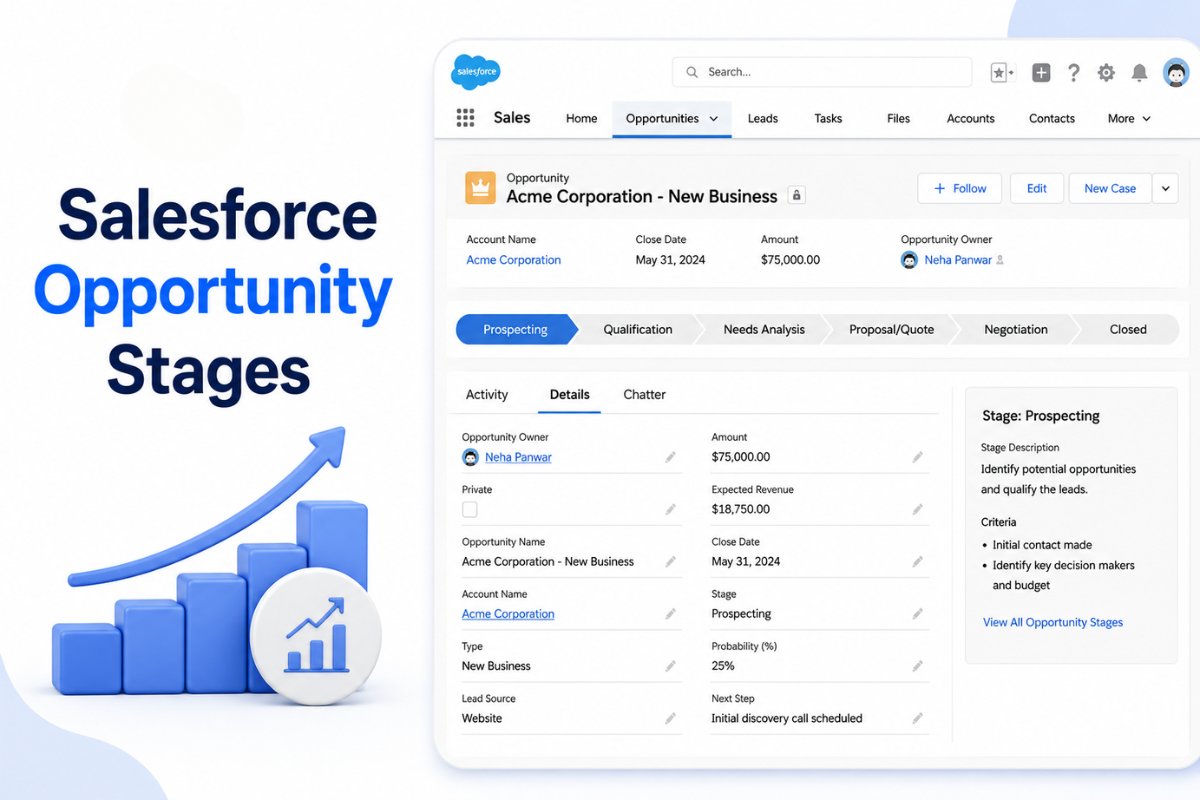
If you are learning Salesforce Sales Cloud, understanding Opportunity Stages is extremely important.
Because this is where the actual sales pipeline lives.
And honestly, many beginners initially think Opportunity Stages are just dropdown values inside Salesforce.
But in real businesses, these stages directly affect:
- Revenue forecasting
- Sales reporting
- Pipeline visibility
- Manager decisions
- Sales team performance
I have seen companies completely lose trust in their CRM simply because Opportunity Stages were poorly managed.
Deals stayed stuck forever.
Sales reps skipped stages.
Forecasts became unreliable.
Pipeline reports stopped making sense.
This is why understanding Opportunity Stages properly is so important.
In this guide, we will understand:
- What Opportunity Stages are
- Why they matter
- Standard Salesforce stages
- Real sales examples
- Forecasting and probabilities
- Common mistakes
- Best practices used in real Salesforce projects
By the end of this article, Salesforce pipelines will start making much more practical sense.
What are Opportunity Stages in Salesforce?
Opportunity Stages represent the different phases of a sales deal inside Salesforce.
As a deal moves through the sales process, sales reps update the stage to reflect the current status.
In simple words:
Opportunity Stages show how close a deal is to getting closed.
For example:
A deal may move through stages like:
- Prospecting
- Qualification
- Proposal
- Negotiation
- Closed Won
This helps companies track sales progress properly.
The Simplest Way to Understand Opportunity Stages
You can think of Opportunity Stages like this:
Each stage answers one question:
“How far has this sales deal progressed?”
That is the core purpose of Opportunity Stages.
Real Business Example
Suppose your company sells Salesforce implementation services.
A business contacts your sales team.
Initially, the deal may enter:
Prospecting
The customer is interested, but discussions are still early.
Later, after meetings and requirement gathering:
Qualification
The sales team confirms:
- Budget exists
- Requirements are real
- Decision makers are involved
Next:
Proposal
The company sends pricing and implementation plans.
Then:
Negotiation
Final pricing and contract discussions happen.
Finally:
Closed Won
The customer signs the agreement.
This entire journey is managed using Opportunity Stages.
How Opportunity Stages Fit into the Salesforce Sales Process
Opportunity Stages actually come after Lead Conversion.
The usual business flow looks like this:
Website Inquiry
        ↓
Lead
        ↓
Lead Qualification
        ↓
Lead Conversion
        ↓
Opportunity Created
        ↓
Opportunity Stages
        ↓
Closed Won / Closed Lost
If you want to understand how Opportunities are created from Leads, our Salesforce lead conversion process explained Process guide explains this entire workflow practically.
And if you still get confused between Leads and Opportunities themselves, understanding the actual difference between a potential customer and a real sales deal becomes much easier after reading our detailed Salesforce leads vs opportunities explained guide.
Standard Salesforce Opportunity Stages
Salesforce provides default Opportunity Stages out of the box.
These usually include:
- Prospecting
- Qualification
- Needs Analysis
- Value Proposition
- Proposal/Price Quote
- Negotiation/Review
- Closed Won
- Closed Lost
However, most businesses customize these stages according to their own sales process.
Common Opportunity Stages Explained
Let’s understand the most commonly used stages with practical meaning.
1. Prospecting Stage
This is the earliest Opportunity Stage.
The sales team believes there may be a business opportunity, but details are still unclear.
Usually:
- Budget is uncertain
- Timeline is unknown
- Customer interest is still being explored
At this stage, the deal is still very early.
2. Qualification Stage
Now the sales team starts validating the deal seriously.
Typical qualification checks include:
- Does the customer have budget?
- Is there an actual business requirement?
- Are decision makers involved?
- Is the project realistic?
This stage is extremely important because poor qualification creates weak pipelines later.
3. Discovery or Needs Analysis Stage
Here the sales team gathers detailed requirements.
For example:
- Technical needs
- Business goals
- User expectations
- Integration requirements
- Timeline discussions
In real projects, this stage often includes multiple meetings and demos.
4. Proposal Stage
Now the company sends:
- Pricing
- Proposal documents
- Scope details
- Timelines
- Commercial plans
At this point, the customer actively evaluates the offer.
5. Negotiation Stage
This is where final discussions happen.
Usually topics include:
- Pricing adjustments
- Contract terms
- Legal approvals
- Final scope alignment
Many deals either close or fail during this stage.
6. Closed Won Stage
The deal is successfully completed.
The customer signs the agreement.
Revenue officially enters the business pipeline.
This is the happiest stage for every sales team.
7. Closed Lost Stage
The deal does not move forward.
Reasons may include:
- Budget issues
- Competitor selection
- Project cancellation
- No decision from customer
A healthy CRM always tracks lost deals properly because this data helps improve future sales strategies.
Opportunity Stages vs Lead Status
This is one of the biggest beginner confusions.
They are completely different concepts.
Lead Status
Tracks inquiry progress.
Examples:
- New
- Working
- Qualified
- Unqualified
Opportunity Stage
Tracks actual deal progress.
Examples:
- Proposal
- Negotiation
- Closed Won
Once a Lead gets converted, the sales process mainly continues through Opportunity Stages.
Why Opportunity Stages Matter So Much
Opportunity Stages are not just labels.
They directly impact:
- Forecasting
- Revenue prediction
- Pipeline reporting
- Sales performance
- Management decisions
This is why businesses take Opportunity Stage management very seriously.
Opportunity Probability in Salesforce
Each Opportunity Stage usually has a probability percentage.
Example:
| Stage | Probability |
|---|---|
| Prospecting | 10% |
| Qualification | 25% |
| Proposal | 60% |
| Negotiation | 85% |
| Closed Won | 100% |
These percentages help Salesforce estimate expected revenue.
Real Forecasting Example
Suppose:
| Opportunity | Amount | Probability |
|---|---|---|
| CRM Implementation | ₹10,00,000 | 80% |
| Integration Project | ₹5,00,000 | 40% |
Salesforce uses probabilities to estimate forecasted revenue.
This helps management predict future business performance.
A Common Beginner Mistake
Many beginners think Opportunity Stages only help sales reps.
But actually:
Sales managers depend heavily on these stages for pipeline visibility.
If stages are inaccurate:
- Forecasts become unreliable
- Reports become misleading
- Revenue predictions fail
- Pipeline reviews become useless
This is why stage discipline matters so much.
What I Have Seen in Real Salesforce Projects
One thing I consistently notice is that companies usually struggle more with process discipline than with Salesforce itself.
For example:
- Sales reps skip stages
- Opportunities remain stuck for months
- Close dates are unrealistic
- Stages do not match actual sales progress
- Duplicate Opportunities get created
And slowly CRM reporting becomes unreliable.
The companies that succeed usually have:
- Clear stage definitions
- Defined exit criteria
- Regular pipeline reviews
- Proper forecasting discipline
- Automation for reminders and follow ups
These operational habits matter more than most beginners realize.
Common Opportunity Stage Mistakes
After working on multiple Salesforce implementations, I repeatedly see these mistakes.
Creating Too Many Stages
Some companies create extremely complicated stage structures.
This creates confusion instead of clarity.
Usually 5 to 7 stages are enough for most businesses.
Unclear Stage Definitions
Stages like:
- Review
- Analysis
- Pending
often create confusion because nobody knows their exact meaning.
Each stage should have clear business purpose.
Keeping Opportunities Stuck Forever
Many sales reps never update stages.
As a result:
- Forecasting becomes inaccurate
- Pipeline quality drops
- Managers lose visibility
This is one of the most common CRM issues.
Using Stages Incorrectly
Sometimes reps move deals into advanced stages just to make pipelines look stronger.
This creates false forecasting confidence.
Healthy CRM culture is extremely important here.
Opportunity Stage Best Practices
Here are some practical recommendations based on real Salesforce implementations.
Keep Stages Simple
Avoid unnecessary complexity.
Most companies work well with:
- Prospecting
- Qualification
- Proposal
- Negotiation
- Closed Won
- Closed Lost
Simple stages improve adoption significantly.
Define Exit Criteria Clearly
Every stage should have clear conditions.
Example:
Proposal Stage Exit Criteria:
- Proposal shared
- Budget discussed
- Decision makers engaged
This improves consistency across sales teams.
Use Salesforce Path
Salesforce Path helps sales reps understand:
- Current stage
- Required actions
- Next steps
- Key guidance
This improves stage management significantly.
Review Pipelines Regularly
Managers should regularly review:
- Stuck Opportunities
- Old Close Dates
- Inactive deals
- Unrealistic forecasts
This keeps CRM data healthy.
Automation Helps Opportunity Management
Modern Salesforce organizations automate many Opportunity activities.
Examples include:
- Follow up reminders
- Task creation
- Approval processes
- Notification alerts
- Forecasting workflows
Most companies now use Salesforce Flow automation for these business processes.
If you are new to Salesforce automation, understanding Salesforce Flow becomes extremely important because modern Salesforce orgs rely heavily on it for sales automation.
Why Security and Access Matter
As sales teams grow, controlling Opportunity visibility becomes important.
Not every user should see every Opportunity.
This is where Salesforce Roles vs Profiles: Key Differences and When to Use Each help businesses manage access and permissions properly.
Understanding Opportunity Stages Makes Salesforce Easier
Once beginners properly understand Opportunity Stages, Salesforce Sales Cloud starts feeling much more logical.
Because now you understand:
- How deals move through pipelines
- How forecasting works
- Why CRM discipline matters
- Why reporting depends on stage accuracy
And honestly, this becomes one of the foundational concepts for mastering Salesforce Sales Cloud.
FAQ
What are Opportunity Stages in Salesforce?
Opportunity Stages represent the different phases of a sales deal inside Salesforce. They help businesses track deal progress from early discussions to final closure and improve sales forecasting accuracy.
Why are Opportunity Stages important in Salesforce?
Opportunity Stages help businesses manage pipelines, predict future revenue, track deal progress, and improve forecasting. Sales managers rely heavily on accurate stages for reporting and pipeline visibility.
Can Opportunity Stages be customized in Salesforce?
Yes, Salesforce allows businesses to fully customize Opportunity Stages according to their sales process. Most companies modify the default stages to better match their real business workflows.
What is the difference between Lead Status and Opportunity Stage?
Lead Status tracks the progress of an inquiry before qualification, while Opportunity Stage tracks the progress of an actual sales deal after Lead conversion. They belong to different parts of the sales process.
How many Opportunity Stages should a company use?
Most businesses work effectively with around 5 to 7 Opportunity Stages. Too many stages usually create confusion, reduce reporting clarity, and make pipeline management harder.


