





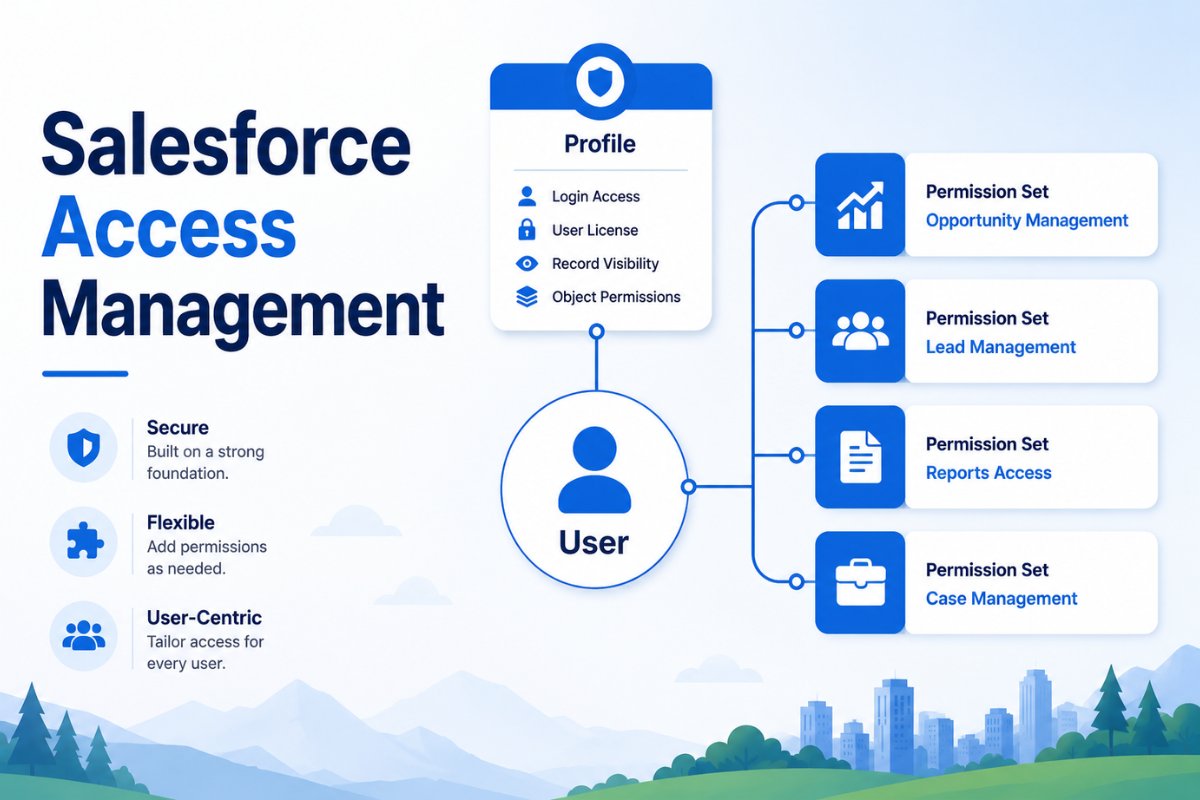
If you’ve been working with Salesforce for a while, you’ve probably come across both Profiles and Permission Sets. At first, they seem similar because both control what users can access. However, they serve different purposes, and understanding when to use each one can make user management much easier.
A common mistake many Salesforce admins make is creating multiple profiles whenever a small group of users needs additional access. While that approach may work initially, it quickly becomes difficult to maintain as the organization grows.
Imagine a Sales team where only a few users need access to Campaigns for a short-term project. Should you create a brand-new profile just for those users? In most situations, the answer is no. This is exactly where Permission Sets become useful.
Over the last few Salesforce releases, Salesforce has been encouraging organizations to move toward a Permission Set-driven security model. In fact, Salesforce now recommends using Profiles mainly for baseline settings while managing permissions through Permission Sets and Permission Set Groups.
In this guide, you’ll learn when Permission Sets are a better choice than Profiles, why Salesforce is moving in this direction, and how admins use Permission Sets in real-world projects.
If you’re still learning Salesforce security, you should also read:
- Salesforce Organization-Wide Defaults (OWD)
- Salesforce Sharing Rules with Real Examples
- Salesforce Permission Sets for Beginners
- Profiles vs Permission Sets in Salesforce with Real Examples
Understanding Profiles in Salesforce
Before discussing Permission Sets, it’s important to understand the purpose of Profiles.
Every Salesforce user must have exactly one Profile.
A Profile typically controls:
- Login hours
- Login IP restrictions
- Default apps
- Page layouts
- Record type assignments
- Basic object access
Profiles were originally designed to handle most user permissions. As Salesforce orgs became larger and more complex, however, this approach created management challenges.
For example, suppose your company has:
- Sales Users
- Marketing Users
- Support Users
Initially, three profiles may be enough.
Later, Marketing managers need report access.
Then a few support users need campaign access.
Soon, you end up creating multiple variations of the same profile.
As a result, profile management becomes difficult and time-consuming.
What Are Permission Sets?
Permission Sets allow admins to grant additional access..
Instead of creating another profile, you simply assign extra permissions to the users who need them.
Permission Sets can grant:
- Object permissions
- Field permissions
- App access
- Apex class access
- Visualforce page access
- System permissions
Most importantly, a user can have multiple Permission Sets.
This flexibility makes them much easier to manage than creating dozens of custom profiles.
Why Salesforce Recommends Permission Sets
Salesforce now recommends a “minimum access” approach.
The idea is simple:
- Give users a basic profile.
- Add only the permissions they actually need using Permission Sets.
- Group permissions using Permission Set Groups when necessary.
This approach follows the principle of least privilege, which means users receive only the access required to perform their jobs.
Consequently, security improves while administration becomes easier.

When Permission Sets Are Better Than Profiles
Let’s look at practical situations where Permission Sets are the better option.
1. When Only a Few Users Need Additional Access
This is probably the most common scenario.
Suppose your Sales team uses a standard Sales profile.
One day, two sales managers need access to Campaigns.
Instead of creating:
- Sales User Profile
- Sales User Plus Campaign Profile
You can simply create a Campaign Access Permission Set and assign it to those two users.
As a result, profile sprawl is avoided.
2. When Access Is Temporary
Many organizations run short-term projects.
For example:
- Data migration projects
- Marketing campaigns
- Audits
- Seasonal support teams
During these projects, users often need temporary access.
Rather than creating temporary profiles, assign a Permission Set and remove it later.
This keeps the security model much cleaner.
3. When Users Work Across Multiple Teams
In larger organizations, users often perform responsibilities outside their primary role.
For instance:
A Sales Operations specialist may need:
- Opportunity access
- Reporting permissions
- Campaign visibility
Creating a custom profile for every combination quickly becomes impossible.
Permission Sets solve this problem by allowing admins to combine permissions as needed.
4. When You Want to Reduce the Number of Profiles
One of the biggest challenges in mature Salesforce orgs is profile sprawl.
Over time, admins create profiles such as:
- Sales User
- Sales User Plus Reports
- Sales User Plus Campaigns
- Sales User Plus Reports and Campaigns
Initially, this may seem manageable. However, as the business grows, maintaining dozens of nearly identical profiles becomes difficult.
Instead, many Salesforce admins now use:
- One baseline profile
- Multiple reusable Permission Sets
This approach is easier to maintain and scales much better.
5. During New Feature Rollouts
Suppose your organization is implementing a new feature.
Perhaps you’re introducing:
- Campaign management
- Forecasting
- Advanced reporting
- Territory management
Not every user needs access immediately.
Instead of modifying profiles for everyone, you can create a Permission Set and assign it only to pilot users.
As a result, testing becomes easier and access can be expanded gradually.
6. For Project-Based Access
Projects often require temporary permissions.
For example:
A data cleanup project may require users to:
- Edit records they normally cannot edit
- Access custom objects
- Run reports
- Export data
Rather than creating project-specific profiles, admins can assign a Permission Set for the duration of the project.
Once the project is complete, the Permission Set can simply be removed.
7. When Using Permission Set Groups
As organizations grow, individual Permission Sets can become difficult to manage.
This is where Permission Set Groups become valuable.
A Permission Set Group allows multiple Permission Sets to be bundled together.
For example, a Marketing team might need:
- Campaign Access
- Report Builder Access
- Dashboard Access
- Email Template Access
Instead of assigning four separate Permission Sets, you can assign one Permission Set Group.
This simplifies administration and improves consistency.

A Simple Rule I Follow
Over the years, I’ve found one simple rule useful when deciding between Profiles and Permission Sets.
If every user in a role needs the same baseline access, I use a Profile.
If only some users need additional permissions, I use a Permission Set.
This approach keeps profiles simple while making access management far more flexible.
Additionally, it reduces the number of custom profiles that need ongoing maintenance.
Profiles vs Permission Sets: A Practical Comparison
| Scenario | Use Profile | Use Permission Set |
|---|---|---|
| Baseline user setup | Yes | No |
| Login hours | Yes | No |
| IP restrictions | Yes | No |
| Additional permissions | No | Yes |
| Temporary access | No | Yes |
| Feature rollouts | No | Yes |
| Project-based access | No | Yes |
| Permission expansion | No | Yes |
For most modern Salesforce orgs, Profiles establish the foundation while Permission Sets handle permission management.
Common Mistakes Admins Make
Creating Too Many Profiles
Many admins create new profiles whenever a permission request arrives.
Eventually, dozens of profiles become difficult to manage.
Permission Sets help avoid this problem.
Giving Excessive Access
Sometimes admins assign broad permissions because it’s faster.
However, this increases security risk.
Instead, follow the principle of least privilege.
Ignoring Permission Set Groups
As organizations scale, Permission Set Groups become increasingly valuable.
They reduce manual assignments and simplify user management.
Not Reviewing Access Regularly
User responsibilities change over time.
Therefore, permission reviews should be performed regularly to ensure access remains appropriate.
Best Practices for Permission Sets
To keep access management clean and scalable:
- Use Profiles only for baseline settings.
- Use Permission Sets for additional access.
- Create Permission Set Groups for common job functions.
- Follow a consistent naming convention.
- Review assignments regularly.
- Remove unused Permission Sets.
- Test changes in Sandbox first.
Furthermore, document your access model so future admins can understand how permissions are structured.
Frequently Asked Questions
Can a user have multiple Permission Sets?
Yes.
A Salesforce user can have multiple Permission Sets assigned simultaneously.
Can Permission Sets replace Profiles completely?
No.
Every Salesforce user still requires a Profile.
However, Salesforce recommends keeping Profiles minimal and using Permission Sets for most permissions.
What is the biggest advantage of Permission Sets?
Flexibility.
Admins can grant additional access without creating new profiles.
When should I create a new Profile?
Only when baseline settings differ significantly between user groups.
What are Permission Set Groups?
Permission Set Groups allow multiple Permission Sets to be bundled together and assigned as a single unit.
Final Thoughts
Permission Sets have become one of the most important tools for managing user access in Salesforce.
While Profiles still play an important role, they should primarily be used for baseline settings such as login restrictions, page layouts, and default configurations.
Whenever users need additional permissions, Permission Sets are usually the better option.
They provide flexibility, reduce profile sprawl, and align with Salesforce’s recommended security model.
If you’re currently creating new profiles every time someone requests additional access, it may be worth reconsidering your approach.
In many cases, a well-designed Permission Set or Permission Set Group can solve the problem more efficiently.
As Salesforce continues moving toward a Permission Set-driven access model, understanding when to use Permission Sets instead of Profiles will become an increasingly valuable skill for every Salesforce administrator.


