When building Lightning Web Components in Salesforce, understanding lifecycle hooks is extremely important. Lifecycle hooks help developers control what happens when a component loads, renders, updates, or gets removed from the page.
If you are starting with Lightning Web Components, lifecycle hooks are one of the first advanced concepts you should learn after understanding component creation and Salesforce project setup from VS Code Setup for Salesforce Development and Salesforce Inspector Chrome Extension Guide for Beginners
In this guide, we will understand every major Salesforce LWC lifecycle hook with simple explanations, real examples, best practices, and common mistakes.

What Are Lifecycle Hooks in LWC?
Lifecycle hooks are special JavaScript callback methods automatically executed by the Lightning Web Components framework during different stages of a component’s lifecycle.
These hooks help developers:
- Initialize components
- Load server data
- Access DOM elements
- Handle rendering logic
- Clean up resources
- Catch runtime errors
In simple words, lifecycle hooks let you control how your component behaves from creation to destruction.
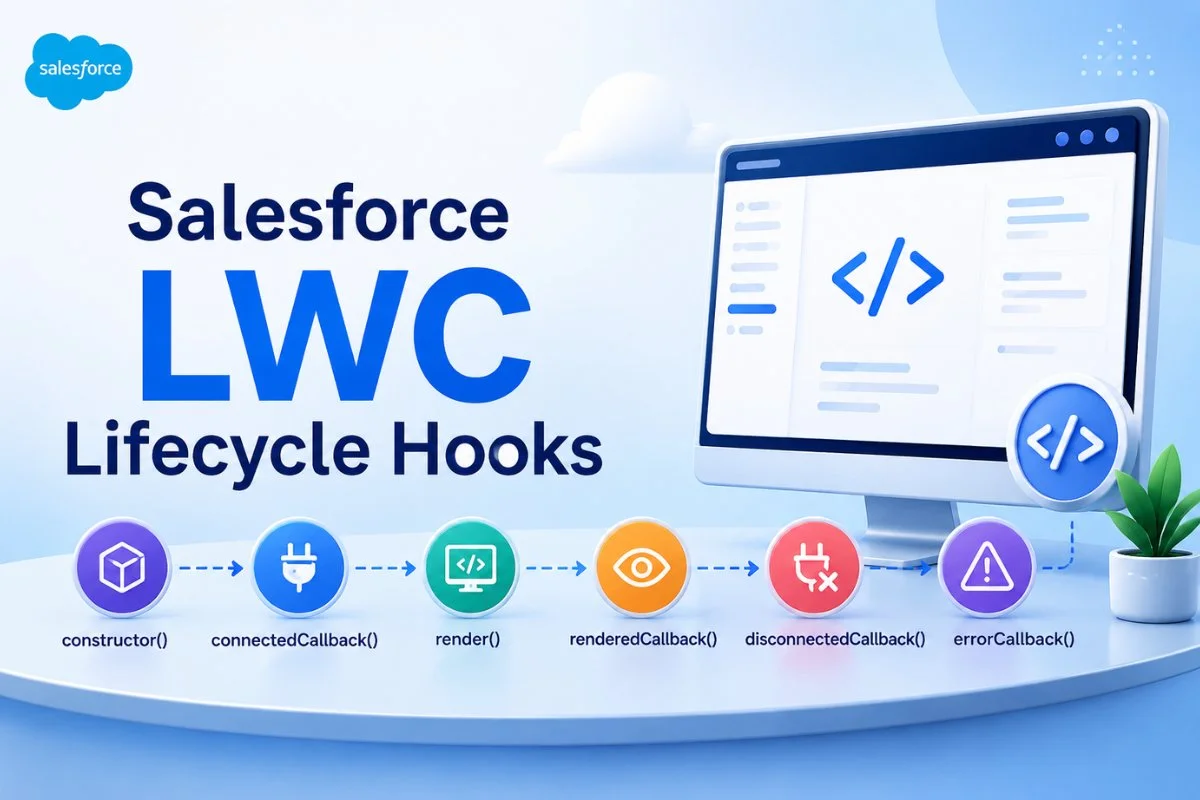
LWC Component Lifecycle Flow
A Lightning Web Component usually follows this lifecycle order:
- constructor()
- connectedCallback()
- render()
- renderedCallback()
- disconnectedCallback()
- errorCallback()
Each hook runs at a different stage.

constructor() in LWC
The constructor runs first when the component instance is created.
This hook is mainly used for:
- Initializing variables
- Setting default values
- Binding methods
Important Rules
Inside constructor():
- Always call super()
- Do not access DOM elements
- Do not call Apex methods
- Do not access child components
Example
import { LightningElement } from 'lwc';

export default class DemoComponent extends LightningElement {

    counter = 0;

    constructor() {
        super();

        this.counter = 1;

        console.log('Constructor executed');
    }
}
The constructor should remain lightweight. Heavy operations here can slow component initialization.
connectedCallback() in LWC
The connectedCallback() method runs when the component is inserted into the DOM.
This is one of the most commonly used lifecycle hooks in Salesforce LWC development.
Developers usually use it for:
- Calling Apex methods
- Fetching data
- Loading records
- Setting timers
- Subscribing to events
Apex Trigger Tutorial for Beginners in Salesforce If you are working with Apex integrations, this hook becomes very important alongside concepts explained in and SOQL Query Examples for Beginners in Salesforce (2026 Guide)
Example
import { LightningElement } from 'lwc';

export default class AccountList extends LightningElement {

    connectedCallback() {
        console.log('Component inserted into DOM');
    }
}
Real Example with Apex
import { LightningElement } from 'lwc';
import getAccounts from '@salesforce/apex/AccountController.getAccounts';

export default class AccountData extends LightningElement {

    accounts;

    connectedCallback() {

        getAccounts()
            .then(result => {
                this.accounts = result;
            })
            .catch(error => {
                console.error(error);
            });
    }
}
This approach is widely used in real Salesforce projects.
render() in LWC
The render() hook helps dynamically decide which HTML template should be displayed.
Most developers do not use this hook frequently, but it becomes useful for advanced UI rendering.
Example
import { LightningElement } from 'lwc';

import desktopTemplate from './desktop.html';
import mobileTemplate from './mobile.html';

export default class ResponsiveComponent extends LightningElement {

    isMobile = false;

    render() {

        return this.isMobile
            ? mobileTemplate
            : desktopTemplate;
    }
}
This hook is useful in responsive UI designs and enterprise applications.
renderedCallback() in LWC
The renderedCallback() method runs after the component finishes rendering on the page.
This hook is mainly used for:
- Accessing DOM elements
- Initializing third-party libraries
- Performing UI calculations
- Working with charts
Example
import { LightningElement } from 'lwc';

export default class DemoRender extends LightningElement {

    renderedCallback() {

        console.log('Component rendered');
    }
}
Accessing DOM Elements
renderedCallback() {

    const divElement =
        this.template.querySelector('div');

    console.log(divElement);
}
Many developers accidentally create infinite rerender loops inside renderedCallback().
Wrong Example
renderedCallback() {

    this.counter++;
}
This continuously updates the component and causes performance issues.
Correct Approach
hasRendered = false;

renderedCallback() {

    if(this.hasRendered) {
        return;
    }

    this.hasRendered = true;

    console.log('Run only once');
}
Performance optimization is extremely important in LWC, especially when handling large datasets or integrations like those covered in Salesforce REST API
disconnectedCallback() in LWC
The disconnectedCallback() method runs when the component is removed from the DOM.
This hook is used for cleanup operations.
Common Use Cases
- Removing event listeners
- Clearing timers
- Unsubscribing platform events
- Destroying external libraries
Example
import { LightningElement } from 'lwc';

export default class TimerComponent extends LightningElement {

    intervalId;

    connectedCallback() {

        this.intervalId =
            setInterval(() => {

                console.log('Running');

            }, 1000);
    }

    disconnectedCallback() {

        clearInterval(this.intervalId);

        console.log('Timer cleared');
    }
}
Without proper cleanup, memory leaks can occur in enterprise applications.
errorCallback() in LWC
The errorCallback() hook catches errors from child components.
This helps create better error handling in Lightning applications.
Example
import { LightningElement } from 'lwc';

export default class ParentComponent extends LightningElement {

    errorCallback(error, stack) {

        console.error(error);

        console.error(stack);
    }
}
This hook is useful in complex component hierarchies and reusable UI frameworks.
Real Lifecycle Execution Order
Here is the actual lifecycle flow in Salesforce LWC:
Initial Load
- constructor()
- connectedCallback()
- render()
- renderedCallback()
Re-render
- render()
- renderedCallback()
Component Removal
- disconnectedCallback()

Best Practices for LWC Lifecycle Hooks
Keep constructor() Simple
Only initialize variables inside constructor.
Use connectedCallback() for Data Loading
This is the safest place to call Apex or initialize services.
Avoid Updating State in renderedCallback()
Improper state updates can create infinite rendering loops.
Always Clean Resources
Use disconnectedCallback() to clear timers and listeners.
Handle Errors Gracefully
Use errorCallback() for better application stability.
Common Mistakes Developers Make
Calling Apex in constructor()
This is not recommended because the component is not fully initialized.
Manipulating DOM Too Early
DOM elements are not available in constructor() or connectedCallback().
Infinite Re-rendering
Updating tracked properties inside renderedCallback() causes loops.
Forgetting Cleanup
Not clearing intervals or listeners can impact performance.
Lifecycle Hooks vs Aura Lifecycle Events
Many developers moving from Aura Components to LWC often compare lifecycle methods.
LWC lifecycle hooks are:
- Faster
- Cleaner
- Standards-based
- Easier to maintain
This is one reason Lightning Web Components are replacing Aura Components in modern Salesforce development.
When Should You Use Each Lifecycle Hook?
| Lifecycle Hook | Main Purpose |
|---|---|
| constructor() | Initialize variables |
| connectedCallback() | Fetch data and setup |
| render() | Dynamic template rendering |
| renderedCallback() | Access DOM and UI logic |
| disconnectedCallback() | Cleanup operations |
| errorCallback() | Handle child component errors |
Final Thoughts
Understanding Salesforce LWC lifecycle hooks is essential for building scalable and high-performance Lightning Web Components.
Most real-world Salesforce projects heavily rely on connectedCallback(), renderedCallback(), and disconnectedCallback() for handling UI rendering, Apex communication, and cleanup logic.
As you continue learning LWC, you should also explore advanced concepts like parent-child communication, wire adapters, and imperative Apex calls. These topics work closely with lifecycle hooks in real Salesforce applications.
For better backend understanding, you can also read: