Salesforce Lightning Web Components provide multiple ways to fetch and manage data, but one of the most powerful and commonly used approaches is the @wire decorator.
The @wire decorator allows LWC components to connect with Salesforce data reactively without manually handling promises or callbacks in most situations.
In real Salesforce projects, developers frequently use @wire with:
- Apex methods
- Lightning Data Service
- UI Record API
- Picklist values
- Object metadata
If you are learning Lightning Web Components, understanding @wire is essential because it is heavily used in enterprise Salesforce applications.
Before learning @wire, make sure you understand SOQL Query Examples for Beginners in Salesforce (2026 Guide), VS Code Setup for Salesforce Development and Salesforce Inspector Reloaded Guide for Beginners and Developers because these concepts are closely connected with real LWC development.

What Is @wire Decorator in LWC?
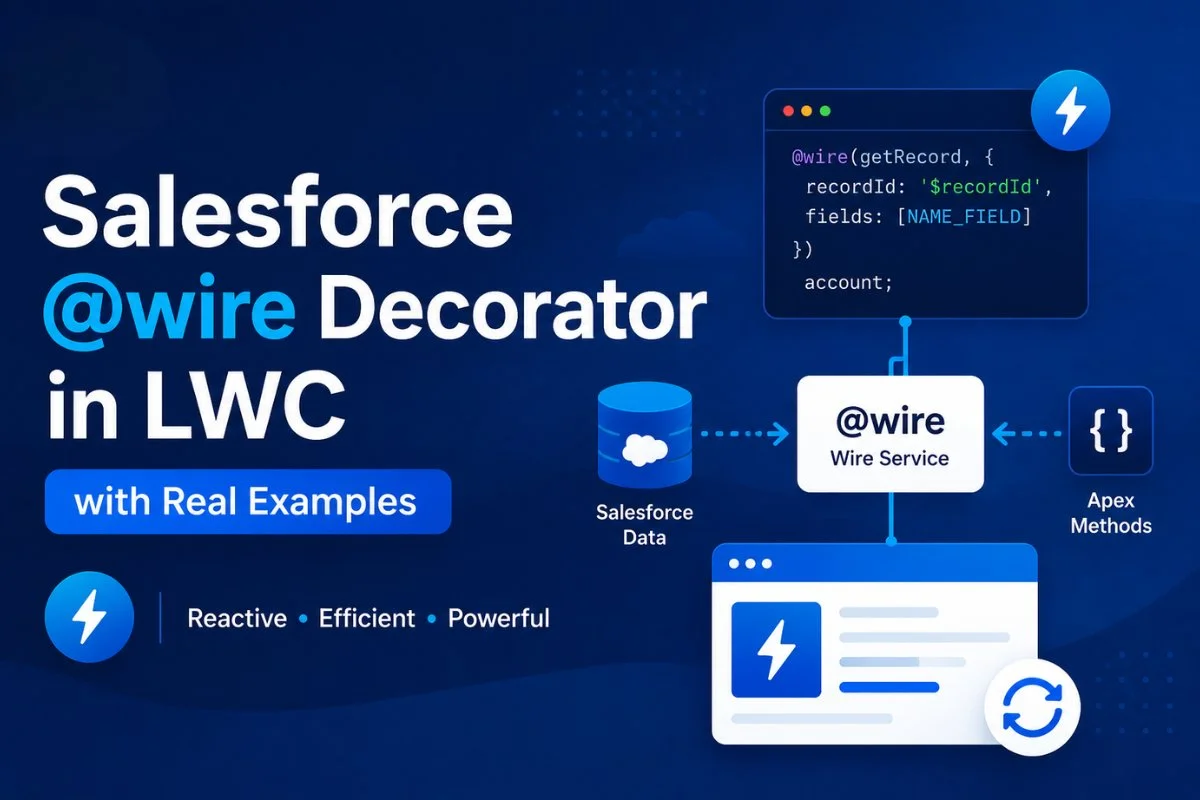
The @wire decorator is a reactive service in Lightning Web Components used to fetch Salesforce data declaratively.
In simple words:
@wire automatically connects your component with Salesforce data sources.
It can retrieve data from:
- Apex classes
- UI APIs
- Lightning Data Service
- Salesforce metadata APIs
Whenever reactive parameters change, the wire service automatically refreshes the data.
This makes applications faster and more efficient.
Developers who already know Salesforce LWC Lifecycle Hooks Explained with Real Examples and usually understand @wire concepts much faster because all these features work together in enterprise Lightning applications.
Why Developers Use @wire in Salesforce LWC
The @wire decorator is widely used because it:
- Reduces JavaScript code
- Supports reactive updates
- Improves performance
- Uses client-side caching
- Simplifies Salesforce data access
- Works well with Lightning Data Service
In enterprise projects, @wire is often preferred over imperative Apex calls for read operations.
If you later explore advanced Salesforce frontend architecture, also read Salesforce LWC Lifecycle Hooks Explained with Real Examples, and Salesforce REST API Tutorial for Beginners with Real Integration Examples because many enterprise projects combine all these concepts together.
Syntax of @wire Decorator
Basic syntax:
@wire(adapter, configuration)
propertyOrFunction;
Example:
@wire(getRecord, {
    recordId: '$recordId',
    fields: [NAME_FIELD]
})
account;
Here:
getRecordis the wire adapterrecordIdis reactive because of$- Result is stored inside
account
How Reactive Parameters Work in @wire
Reactive parameters are one of the most important concepts in LWC.
Whenever a reactive parameter changes, Salesforce automatically reruns the wire service.
Example:
recordId: '$recordId'The $ symbol makes the parameter reactive.
If recordId changes:
- Data reloads automatically
- Component rerenders automatically
This is one reason LWC feels highly dynamic.
Reactive behavior becomes even more important when building advanced UI components using Salesforce Flow Tutorial, and SOQL Tutorial
Using @wire with getRecord
One of the most common uses of @wire is fetching Salesforce records using Lightning Data Service.
JavaScript File
import { LightningElement, api, wire } from 'lwc';

import { getRecord, getFieldValue }
from 'lightning/uiRecordApi';

import NAME_FIELD
from '@salesforce/schema/Account.Name';

import PHONE_FIELD
from '@salesforce/schema/Account.Phone';

export default class AccountViewer
extends LightningElement {

    @api recordId;

    @wire(getRecord, {
        recordId: '$recordId',
        fields: [NAME_FIELD, PHONE_FIELD]
    })
    account;

    get accountName() {

        return this.account.data
            ? getFieldValue(
                this.account.data,
                NAME_FIELD
            )
            : '';
    }

    get accountPhone() {

        return this.account.data
            ? getFieldValue(
                this.account.data,
                PHONE_FIELD
            )
            : '';
    }
}
HTML File
<template>

    <template if:true={account.data}>

        <p>{accountName}</p>
        <p>{accountPhone}</p>

    </template>

    <template if:true={account.error}>

        <p>Error loading account</p>

    </template>

</template>
This approach is very common in record pages and enterprise Lightning applications.
Developers frequently combine getRecord with Salesforce Organization-Wide Defaults (OWD), and to ensure secure data access in production environments.

Understanding data and error in @wire
Every wire service returns:
dataerror
Example:
@wire(getAccounts)
accounts;
You can access:
accounts.data
accounts.error
This structure is standard across most wire adapters.
Understanding proper error handling becomes easier when you also learn Batch Apex for Salesforce tutorial
Using @wire with Apex Methods
Developers often use @wire with Apex methods for custom SOQL queries and business logic.
Apex Class
public with sharing class AccountController {

    @AuraEnabled(cacheable=true)

    public static List<Account> getAccounts() {

        return [
            SELECT Id, Name
            FROM Account
            LIMIT 10
        ];
    }
}
Important:
@AuraEnabled(cacheable=true) is mandatory for wired Apex methods.
JavaScript File
import { LightningElement, wire }
from 'lwc';

import getAccounts
from '@salesforce/apex/AccountController.getAccounts';

export default class AccountList
extends LightningElement {

    @wire(getAccounts)
    accounts;
}
HTML File
<template>

    <template if:true={accounts.data}>

        <template
            for:each={accounts.data}
            for:item="acc">

            <p key={acc.Id}>
                {acc.Name}
            </p>

        </template>

    </template>

</template>
This pattern is extremely common in Salesforce projects.
If you want stronger backend understanding, also read Queueable Apex in Salesforce for Beginners: Complete Async Processing Guide, and Salesforce governor limits explained because wire services often interact with Apex processing logic.
Using @wire with Function
Instead of storing results in a property, developers can wire a function.
This gives more control.
Example
import { LightningElement, wire }
from 'lwc';

import getAccounts
from '@salesforce/apex/AccountController.getAccounts';

export default class WiredFunction
extends LightningElement {

    accounts;
    error;

    @wire(getAccounts)

    wiredAccounts({ data, error }) {

        if(data) {

            this.accounts = data;

        } else if(error) {

            this.error = error;
        }
    }
}
Function wiring is useful when:
- Data needs preprocessing
- Multiple operations are required
- Additional logic is needed
This pattern is commonly used with and salesforce integrations.
Dynamic Parameters in @wire
Reactive parameters are heavily used in real applications.
Apex Example
@wire(getContacts, {
    searchKey: '$searchText'
})
contacts;
Whenever searchText changes:
- Apex method reruns
- Data refreshes automatically
This is commonly used in:
- Search components
- Lookup components
- Dynamic filtering
- Real-time dashboards
Many enterprise developers combine this approach with SOQL Query Examples for Beginners in Salesforce (2026 Guide) .

Difference Between @wire and Imperative Apex
| Feature | @wire | Imperative Apex |
|---|---|---|
| Reactive | Yes | No |
| Caching | Yes | Optional |
| Automatic refresh | Yes | Manual |
| Best for read operations | Yes | Yes |
| Best for DML operations | No | Yes |
| Supports async control | Limited | Full |
Generally:
Use @wire for reading data.
Use imperative Apex for:
- insert
- update
- delete
- complex async flows
You should also read , Salesforce REST API Tutorial for Beginners with Real Integration Examples, and Salesforce Integration because these concepts are often used together in enterprise projects.
Common Mistakes Developers Make
Forgetting cacheable=true
Without:
@AuraEnabled(cacheable=true)the wire service fails.
Updating Data Inside renderedCallback()
This can create infinite rerender loops.
Using @wire for DML Operations
@wire should mainly be used for reading data.
Ignoring Error Handling
Always handle:
errorproperly.
Most beginners make these mistakes while learning Salesforce LWC Lifecycle Hooks Explained with Real Examples and
Best Practices for @wire in LWC
Use @wire for Read Operations
It improves performance and caching.
Prefer Lightning Data Service
Use LDS whenever possible before custom Apex.
Handle Errors Properly
Always display meaningful errors.
Use Reactive Parameters Carefully
Avoid unnecessary rerenders.
Keep Apex Optimized
Poor SOQL queries still affect performance.
Performance optimization becomes even more important in large enterprise applications using Batch Apex vs Queueable Apex comparison, and Salesforce Validation Rules with Real Examples for Beginners
Real-World Use Cases of @wire
Developers commonly use @wire for:
- Loading Account records
- Displaying Contacts
- Fetching Opportunities
- Building dashboards
- Dynamic search
- Metadata retrieval
- Picklist values
- User information
Enterprise Salesforce applications heavily rely on wire adapters.
Real-world projects often combine these implementations with Salesforce Flow Tutorial for Beginners: Complete Step-by-Step, Salesforce REST API Tutorial for Beginners with Real Integration Examples,
@wire Adapters Commonly Used in LWC
Popular wire adapters include:
getRecordgetObjectInfogetPicklistValuesCurrentPageReference- Apex wire methods
These adapters simplify Salesforce frontend development significantly.
Related Articles
- Salesforce LWC Lifecycle Hooks Explained with Real Examples
- Queueable Apex chaining workflow in Salesforce
- Batch Apex for Salesforce tutorial
- Salesforce governor limits explained
- SOQL Query Examples for Beginners in Salesforce (2026 Guide)
- Salesforce REST API Tutorial for Beginners with Real Integration Examples
- Salesforce Inspector Reloaded Guide for Beginners and Developers
Final Thoughts
The @wire decorator is one of the most important concepts in Lightning Web Components because it provides reactive, efficient, and scalable Salesforce data access.
Most enterprise Salesforce applications use @wire extensively for:
- Lightning Data Service
- Apex integrations
- Dynamic UI updates
- Reactive applications
Once you understand @wire, building advanced Lightning Web Components becomes much easier.
FAQs
What is @wire in Salesforce LWC?
@wire is a reactive service used to connect Lightning Web Components with Salesforce data sources.
Why is cacheable=true required in wired Apex?
It enables client-side caching and improves performance.
What is reactive parameter in @wire?
A parameter prefixed with $ automatically refreshes data when its value changes.
Can @wire perform DML operations?
No. @wire is mainly designed for reading data.
What is the difference between @wire property and function?
Property wiring stores results directly, while function wiring allows additional processing logic.