





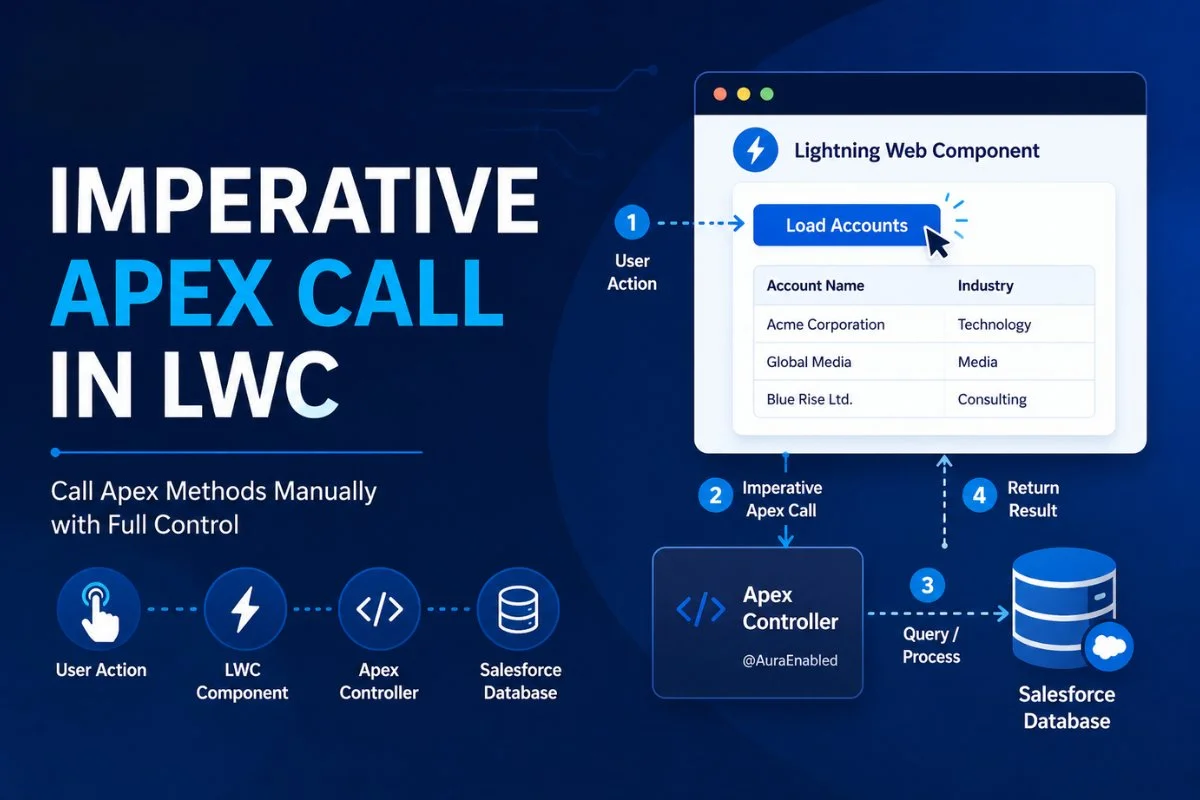
When building Lightning Web Components in Salesforce, developers often need to call Apex methods manually based on user actions like button clicks, form submissions, searches, or record updates. This approach is called an Imperative Apex Call in LWC.
Unlike the wire service, imperative Apex gives developers full control over when the server call should happen.
If you already read Salesforce @wire Decorator in LWC with Real Examples, you probably noticed that @wire automatically fetches data reactively. But many real-world business scenarios require manual execution instead of automatic loading.
That’s where imperative Apex becomes extremely important.
In this guide, you’ll learn:
- What imperative Apex calls are
- When to use imperative Apex instead of
@wire - Real project examples
- Passing parameters to Apex
- Error handling
- Async/await usage
- Best practices
- Common developer mistakes

What Is Imperative Apex Call in LWC?
An imperative Apex call means calling an Apex method manually using JavaScript.
Instead of Salesforce automatically invoking the method like @wire, developers explicitly decide:
- when to call Apex
- what parameters to pass
- how to handle responses
- how to handle errors
In simple words:
@wire = automatic reactive call
Imperative Apex = manual controlled call
This is one of the most important Lightning Web Components concepts for Salesforce developers.
If you are new to LWC basics, first read Salesforce LWC Lifecycle Hooks Explained with Real Examples because lifecycle methods are often used together with imperative Apex calls.
Why Developers Use Imperative Apex Calls
Imperative Apex calls are mainly used when developers need full control over execution.
Common use cases include:
- Button click actions
- Form submissions
- Search functionality
- Record creation
- Record updates
- Delete operations
- Dynamic filters
- Calling non-cacheable Apex methods
- Loading data conditionally
For example:
A user clicks:
“Load Contacts”
Only then should Salesforce fetch records from Apex.
This behavior cannot always be handled properly using @wire.
Imperative Apex vs Wire Service
Many beginners get confused between these two approaches.
Here is the main difference.
| Feature | Imperative Apex | @wire Service |
|---|---|---|
| Execution | Manual | Automatic |
| Best For | User actions | Reactive data |
| Supports DML | Yes | No |
| Full Control | Yes | Limited |
| Async Handling | Manual | Framework-managed |
| Cacheable Required | Optional | Required |
If you haven’t read it yet, also check:
Salesforce @wire Decorator in LWC with Real Examples
Understanding both approaches together is extremely important for interviews and real projects.
When Should You Use Imperative Apex?
Salesforce officially recommends imperative Apex in these scenarios:
1. When User Action Triggers the Call
Example:
- Button click
- Search click
- Save action
2. When Performing DML Operations
Examples:
- insert
- update
- delete
- upsert
3. When You Need Full Control
You decide:
- when to call
- how often to call
- what conditions to apply
4. When Apex Method Is Not Cacheable
@wire requires:
@AuraEnabled(cacheable=true)But imperative Apex can call both:
- cacheable methods
- non-cacheable methods
Basic Imperative Apex Example
Let’s start with a simple real-world example.
Apex Controller
public with sharing class ContactController {

    @AuraEnabled(cacheable=true)
    public static List<Contact> getContacts() {

        return [
            SELECT Id, Name, Email
            FROM Contact
            LIMIT 10
        ];
    }
}
LWC JavaScript
import { LightningElement } from 'lwc';

import getContacts
from '@salesforce/apex/ContactController.getContacts';

export default class ContactList extends LightningElement {

    contacts;
    error;

    async loadContacts() {

        try {

            this.contacts = await getContacts();

            this.error = undefined;

        } catch(error) {

            this.error = error;

            this.contacts = undefined;
        }
    }
}
LWC HTML
<template>

    <lightning-button
        label="Load Contacts"
        onclick={loadContacts}>
    </lightning-button>

    <template if:true={contacts}>

        <template for:each={contacts} for:item="con">

            <p key={con.Id}>
                {con.Name}
            </p>

        </template>

    </template>

</template>
This is one of the most commonly used LWC patterns in Salesforce projects.
Real Project Example: Search Component
One of the best real-world use cases for imperative Apex is dynamic searching.
Apex Controller
public with sharing class AccountController {

    @AuraEnabled(cacheable=true)
    public static List<Account> searchAccounts(String searchKey) {

        String key = '%' + searchKey + '%';

        return [

            SELECT Id, Name
            FROM Account
            WHERE Name LIKE :key
            LIMIT 10
        ];
    }
}
LWC JavaScript
import { LightningElement } from 'lwc';

import searchAccounts
from '@salesforce/apex/AccountController.searchAccounts';

export default class AccountSearch extends LightningElement {

    searchKey = '';

    accounts;

    handleChange(event) {

        this.searchKey = event.target.value;
    }

    async handleSearch() {

        this.accounts =
            await searchAccounts({

                searchKey : this.searchKey
            });
    }
}
LWC HTML
<template>

    <lightning-input
        label="Search Account"
        onchange={handleChange}>
    </lightning-input>

    <lightning-button
        label="Search"
        onclick={handleSearch}>
    </lightning-button>

</template>
This type of search functionality is heavily used in enterprise Salesforce applications.
Passing Parameters to Imperative Apex
One important rule:
Always pass parameters as objects.
Correct:
getAccounts({
    searchKey : this.searchKey
});
Wrong:
getAccounts(this.searchKey);Salesforce expects parameters in object format.
Using async/await in Imperative Apex
Modern Salesforce projects usually use:
async/awaitinstead of traditional promise chaining.
Benefits:
- Cleaner code
- Better readability
- Easier error handling
Example:
async loadData() {

    try {

        this.records =
            await getAccounts();

    } catch(error) {

        console.error(error);
    }
}
Promise-Based Imperative Apex Example
Older projects may still use .then() and .catch().
Example:
getAccounts()

    .then(result => {

        this.accounts = result;

    })

    .catch(error => {

        console.error(error);
    });
Both approaches are valid.
However, async/await is cleaner and easier to maintain.
Error Handling in Imperative Apex
Proper error handling is extremely important.
Best practice:
Always use:
try/catchExample:
try {

    this.contacts =
        await getContacts();

} catch(error) {

    this.error = error.body.message;
}
Good error handling improves user experience significantly.
You should also understand Mixed DML Operation Error in Salesforce with Fixes because many imperative Apex operations involve DML statements.
Imperative Apex for Record Creation
Imperative Apex is commonly used for inserts and updates.
Apex
@AuraEnabled
public static void createAccount(String accName){

    Account acc = new Account(
        Name = accName
    );

    insert acc;
}
LWC JavaScript
import createAccount
from '@salesforce/apex/AccountController.createAccount';

async saveAccount() {

    await createAccount({

        accName : 'Test Account'
    });
}
This type of pattern is used heavily in custom Salesforce forms.
Why Wire Service Cannot Handle DML
The @wire service only supports read operations.
Imperative Apex is required for:
- insert
- update
- delete
because these operations modify Salesforce data.
That is why imperative Apex is extremely important in real-world development.
Imperative Apex with Lifecycle Hooks
Many developers combine imperative Apex with lifecycle hooks like:
connectedCallback()Example:
connectedCallback() {

    this.loadAccounts();
}
This pattern is very common.
Related tutorial:
Salesforce LWC Lifecycle Hooks Explained with Real Examples
Common Mistakes Developers Make
Calling Apex Repeatedly
Too many unnecessary server calls hurt performance.
Not Handling Errors
Unhandled exceptions create bad user experience.
Passing Wrong Parameters
Always pass parameters as objects.
Forgetting Async Handling
Imperative Apex is asynchronous.
Using Imperative Instead of Wire Everywhere
Sometimes @wire is the better choice.
Understanding both approaches is important.
Best Practices for Imperative Apex
Use async/await
Cleaner and modern syntax.
Minimize Server Calls
Avoid unnecessary Apex execution.
Handle Errors Properly
Always use try/catch.
Use Cacheable Methods When Possible
Improves performance.
Keep Apex Bulkified
Server-side logic should follow governor limit best practices.
You should also read:
Salesforce Governor Limits with Real Examples and Best Practices
because poorly designed Apex methods can easily hit limits.
Imperative Apex in Real Enterprise Projects
Large Salesforce applications commonly use imperative Apex for:
- Search systems
- Custom forms
- Dynamic dashboards
- Record updates
- Integration triggers
- File upload flows
- Multi-step wizards
- External API execution
This is why mastering imperative Apex is essential for every Salesforce LWC developer.
Wire vs Imperative: Which One Should You Learn First?
Learn both.
However:
@wireis easier for beginners- Imperative Apex gives more flexibility
Most enterprise Salesforce applications use a combination of both.
Related tutorials:
Salesforce @wire Decorator in LWC with Real Examples
Salesforce REST API Tutorial for Beginners with Real Integration Examples
Apex Trigger Tutorial for Beginners in Salesforce
Queueable Apex in Salesforce for Beginners: Complete Async Processing Guide
Batch Apex in Salesforce: Complete Guide with Real Examples
Final Thoughts
Imperative Apex calls are one of the most important concepts in Salesforce Lightning Web Components because they give developers full control over server communication.
Unlike the reactive wire service, imperative Apex allows developers to trigger Apex manually based on user actions, perform DML operations, pass dynamic parameters, and handle asynchronous processing more flexibly.
In real-world Salesforce projects, imperative Apex is widely used for:
- forms
- search functionality
- record creation
- updates
- integrations
- complex UI workflows
Once you understand imperative Apex properly, building scalable and interactive Lightning Web Components becomes much easier.
FAQs
What is imperative Apex call in LWC?
Imperative Apex means calling an Apex method manually using JavaScript instead of using the automatic @wire service.
When should developers use imperative Apex in LWC?
Developers should use imperative Apex when:
- handling button clicks
- performing DML operations
- controlling execution manually
- passing dynamic parameters
Can imperative Apex perform insert and update operations?
Yes. Imperative Apex supports:
- insert
- update
- delete
- upsert
operations.
What is the difference between imperative Apex and @wire?
@wire automatically fetches data reactively, while imperative Apex gives developers manual control over execution.
Is async/await recommended for imperative Apex?
Yes. Modern Salesforce projects commonly use async/await because it creates cleaner and more readable code.


